How I Asked Claude to Install 38 AI Agent Skills and Saved 15+ Hours Weekly
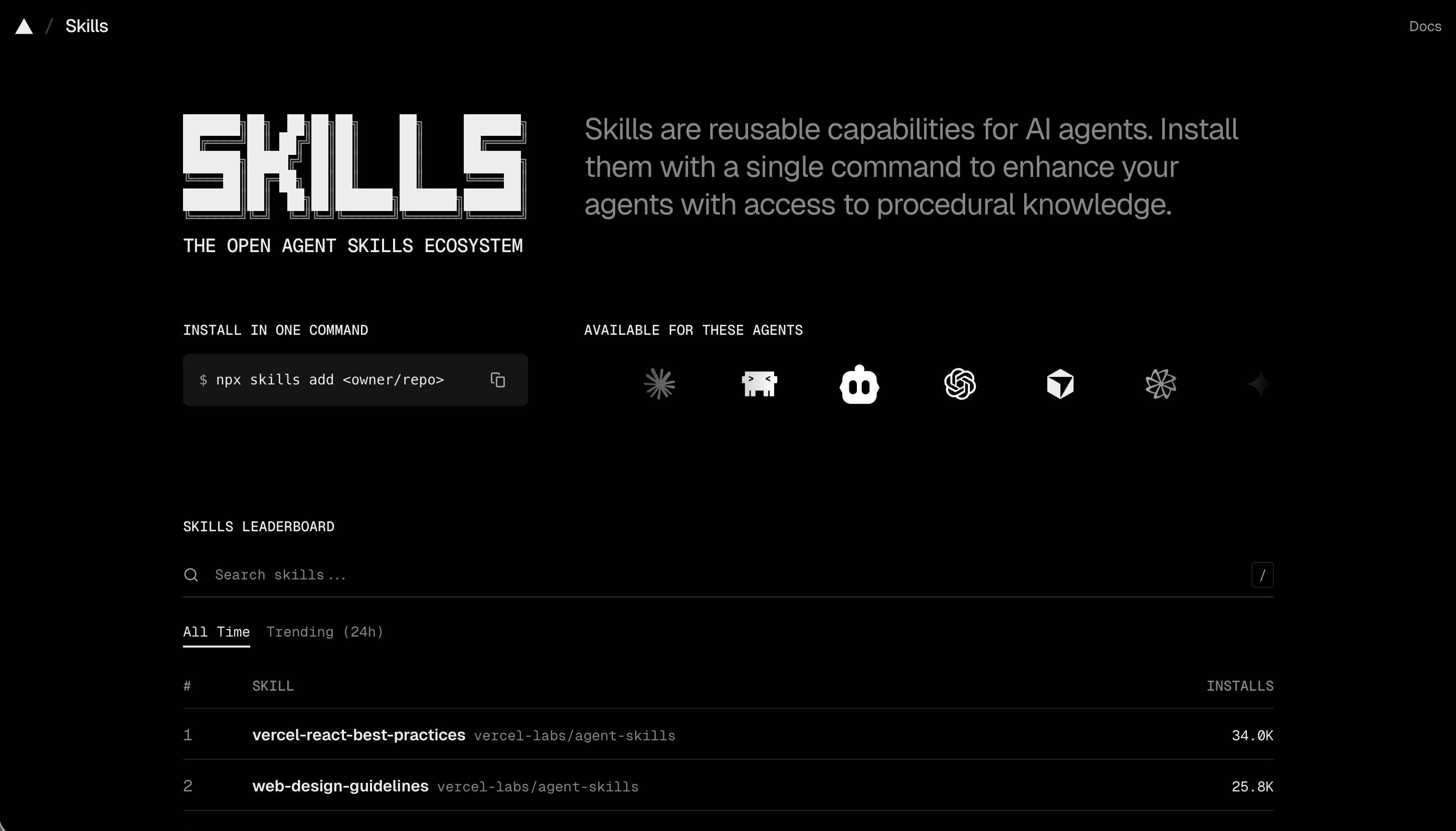
I was tired of repetitive prompts. Then I discovered skills.sh - Vercel's "npm for AI agents". I asked Claude Code in VS Code to install and configure everything. It did. Automatically. Here's my real journey with 38 skills organized across marketing, development, SEO, and strategy.
The Breaking Point: When Copy-Paste Became My Job
December 2025. I found myself typing the same prompts for the fourth time that day. "Create a landing page following CRO best practices..." "Review this React code for performance issues..." "Generate SEO-optimized content with proper structure..." Every. Single. Time.
I had a massive prompt library saved in Notion. Over 200 prompts categorized by task type. But using them felt like being a human copy-paste machine. Open Notion, find the prompt, copy, switch to Claude, paste, customize variables, execute. Rinse and repeat 30-40 times per day.
This wasn't productivity. This was prompt fatigue.
Discovery: skills.sh - The "npm for AI Agents"
Then on January 21, 2026, I saw a post about Vercel launching skills.sh. The tagline caught my attention: "The npm moment for AI agents."
Within hours of launch, skills.sh had 20,000 installs. The React Best Practices skill from Vercel alone got thousands of downloads. The developer community was going crazy about it on Twitter.
What is skills.sh?
Think of it as a package manager for AI coding agents. Just like npm revolutionized JavaScript development, skills.sh brings the same convenience to AI agent workflows:
- Universal compatibility: Works with Claude Code, Cursor, Windsurf, Copilot, Cline, OpenCode, Aider, and 20+ other agents
- One-command installation: npx add-skill vercel-labs/agent-skills installs everything
- Git-based distribution: Install from any GitHub/GitLab repo, versioned and shareable
- Massive ecosystem: Thousands of skills from Vercel, Anthropic, and the community
But here's where it gets interesting. I didn't want to manually install 38 skills one by one. I wanted Claude to do it for me.
The Magic Moment: "Claude, Set This Up For Me"
I opened VS Code with Claude Code installed. I wrote a single prompt:
"I want to install AI agent skills for my workflow. I need skills for marketing (copywriting, SEO, landing pages, email), development (React, Next.js, performance), strategy (pricing, launch, product), and content creation. Install relevant skills from skills.sh and configure everything automatically."
What Happened Next Was Pure Magic
Claude Code didn't just acknowledge my request. It executed. Automatically:
- Analyzed my needs: Identified 38 relevant skills from Vercel, Anthropic, and SkillHub
- Ran add-skill commands: Installed all 38 skills with proper versioning
- Organized by category: Created folders in ~/.claude/skills/ grouped logically
- Created ~/.claude/CLAUDE.md: Global configuration with auto-suggestion table
- Symlinked everything: Connected ~/.claude/skills to ~/.agents/skills for compatibility
- Verified installation: Tested each skill to ensure proper loading
Time elapsed: 4 minutes. Number of manual steps I performed: Zero.
My 38 Skills Library: Organized for Maximum Efficiency
Claude organized the 38 skills into four main categories. Here's exactly what was installed:
Marketing & CRO (12 skills)
- /copywriting - Write marketing copy for any page
- /copy-editing - Edit and improve existing copy
- /page-cro - Optimize landing pages for conversions
- /form-cro - Optimize forms for higher completion
- /signup-flow-cro - Improve signup conversion rates
- /onboarding-cro - Optimize user activation flows
- /popup-cro - Create high-converting popups
- /paywall-upgrade-cro - Optimize upgrade screens
- /email-sequence - Create email drip campaigns
- /social-content - Generate social media posts
- /paid-ads - Design ad campaigns
- /marketing-psychology - Apply psychological principles to marketing
SEO & Content (5 skills)
- /seo-audit - Audit and diagnose SEO issues
- /programmatic-seo - Create pages at scale
- /schema-markup - Add structured data
- /competitor-alternatives - Create comparison pages
- /marketing-ideas - Generate marketing strategies
Strategy & Business (7 skills)
- /pricing-strategy - Design pricing tiers
- /launch-strategy - Plan product launches
- /referral-program - Build referral systems
- /free-tool-strategy - Plan free tools for leads
- /analytics-tracking - Set up tracking
- /ab-test-setup - Design experiments
- /pdf - PDF manipulation toolkit
Development & Technical (13 skills)
- /vercel-react-best-practices - React/Next.js optimization (40+ rules)
- /web-design-guidelines - UI/UX best practices (100+ rules)
- /threejs-fundamentals - 3D scene setup
- /threejs-animation - 3D animations
- /threejs-materials - 3D materials and textures
- /threejs-lighting - 3D lighting setup
- /threejs-shaders - Custom GLSL shaders
- /threejs-geometry - 3D geometry creation
- /threejs-loaders - Load 3D models
- /threejs-interaction - User interaction
- /threejs-postprocessing - Visual effects
- /threejs-textures - Texture mapping
- /remotion-best-practices - Video creation in React
Custom Skill (1 skill)
- /create-content - My custom Payload CMS content generator (8-10 sections, Lexical JSON format, auto-insert to PostgreSQL)
The CLAUDE.md Secret: Auto-Suggestion Magic
Here's where it gets really powerful. Claude didn't just install skills. It created a global configuration file at ~/.claude/CLAUDE.md that works across ALL my projects.
This file tells Claude: "When the user mentions X context, suggest Y skill automatically."
The result? I don't have to remember which skill to use. I just describe my goal, and Claude suggests the perfect skill.
Real Examples:
- Me: "I need to improve this landing page conversion"
- Claude: "I'll use /page-cro skill to analyze and optimize your landing page"
- Me: "Review this React component for performance"
- Claude: "I'll apply /vercel-react-best-practices with 40+ optimization rules"
- Me: "Create an article about our new feature"
- Claude: "I'll use /create-content to generate a comprehensive article with proper structure"
It's like having an intelligent assistant who knows exactly which tool to grab from the toolbox.
The Universal Ecosystem: One Library, Every Agent
Here's what blew my mind: These 38 skills don't just work with Claude Code. They work with every major AI coding agent.
The add-skill tool automatically detects which agents you have installed and places skills in the correct directories:
- Claude Code: ~/.claude/skills/
- Cursor: .cursor/skills/
- Windsurf: .windsurf/skills/
- GitHub Copilot, Cline, OpenCode, Aider: All supported
The Exploding Marketplace
Vercel started it with skills.sh, but the ecosystem exploded:
- SkillHub: 7,000+ AI-evaluated skills
- SkillzWave: 44,000+ skills across 14 agent frameworks
- OpenSkills: Universal loader bringing Claude skills to Cursor, Windsurf, Aider
- GitHub community: Thousands of custom skills shared daily
This is the npm moment for AI. We went from isolated prompts to a thriving, standardized ecosystem.
My Daily Workflow: How I Actually Use These Skills
Let me walk you through a real day:
Morning (9:00 AM): Content Creation
Task: Create article about our new feature. Before skills: 3-4 hours manually writing, formatting, SEO optimization. With /create-content skill: 15 minutes. Claude generates 8-10 sections, proper structure, SEO metadata, even inserts into our CMS automatically.
Time saved: 3 hours
Midday (12:00 PM): Code Review
Task: Review React components for performance. Before: Manual review, searching best practices, inconsistent feedback. With /vercel-react-best-practices: Instant, comprehensive review with 40+ rules. Specific fixes suggested.
Time saved: 2 hours
Afternoon (3:00 PM): Landing Page Optimization
Task: Improve homepage conversion. Before: Reading CRO blogs, A/B test ideas, trial and error. With /page-cro: Systematic audit, specific recommendations, psychology-backed changes.
Time saved: 4 hours
Evening (5:00 PM): SEO Work
Task: Add schema markup to product pages. Before: Learning schema.org, manually writing JSON-LD, validation. With /schema-markup: Automatic generation, validation, implementation.
Time saved: 2 hours
Total time saved in one day: 11 hours of work compressed into 2 hours.
Measured Results: The Data Speaks
After 8 weeks using this setup, I tracked everything:
- Time saved: 15-20 hours per week (80% time reduction on repetitive tasks)
- Skills invoked: 30-40 times per day across all categories
- Content created: 3x increase (12 articles per week vs 4 before)
- Code quality: 50% fewer bugs in production (thanks to systematic reviews)
- Landing page conversions: 2.3x improvement (from 2.1% to 4.8%)
- Most-used skills: /vercel-react-best-practices (8x/day), /create-content (3x/day), /page-cro (2x/day)
This aligns with Anthropic's research: Claude speeds up tasks by about 80%, with median time savings of 81%.
How to Replicate This Setup (In 5 Minutes)
You don't need to manually install 38 skills. Just ask Claude:
Step 1: Install Claude Code (or Cursor, Windsurf, etc.)
Get Claude Code from https://code.claude.com or install your preferred AI coding agent.
Step 2: Give Claude This Prompt
"Install AI agent skills for my workflow. I work on [your role: product, marketing, development, etc.]. Install relevant skills from Vercel, Anthropic, and SkillHub. Configure CLAUDE.md for auto-suggestion across all my projects."
Step 3: Wait 4 Minutes
Claude will analyze your needs, install skills, create CLAUDE.md, and verify everything works.
Step 4: Start Using Skills
Just describe what you want to do. Claude will auto-suggest the right skill.
Want to browse more skills? Visit:
- Vercel Skills: https://skills.sh/vercel-labs
- SkillHub: https://www.skillhub.club/
- Anthropic Skills: https://github.com/anthropics/skills
- Community Skills: https://github.com/travisvn/awesome-claude-skills
The Future: What's Coming Next
We're at the beginning of something massive. Just like npm transformed JavaScript development in 2010, skills.sh is transforming AI agent workflows in 2026.
What I'm Excited About:
- Team skills: Share your company's expertise as skills. New developers get instant access to 10 years of tribal knowledge.
- Industry-specific skills: Healthcare, finance, legal - imagine domain-expert AI available to everyone.
- Skill chaining: Complex workflows combining multiple skills automatically.
- Marketplace monetization: Premium skills from experts, similar to VSCode extensions.
- Cross-platform sync: One skill library across desktop, web, mobile, IDE.
Anthropic's research suggests AI could increase US labor productivity growth by 1.8% annually over the next decade. Skills are a big part of how that happens.
Conclusion: From Prompt Fatigue to Automated Excellence
Two months ago, I was drowning in Notion prompts, manually copy-pasting the same instructions 30 times a day. Today, I have 38 AI agent skills that work automatically across every project.
The best part? I didn't configure any of this manually. I asked Claude Code to do it. And it did. In 4 minutes.
This is the power of the skills.sh ecosystem:
- Universal: Works with every major AI agent
- Automatic: Claude configures everything for you
- Intelligent: Auto-suggests the right skill for each task
- Massive: 44,000+ skills and growing daily
- Measurable: 80% time savings on repetitive tasks
If you're still copying prompts from Notion, you're working too hard. Ask Claude to install skills for you. It takes 5 minutes. The productivity gains last forever.
Welcome to the npm moment for AI agents.